Robocalls
SCREEN INCOMING CALLS
PREVENT YOUR BUSINESS FROM BEING BLOCKED
JANUARY 2026 | Nextworks

Tired of all the junk in your inbox, mailbox, texts, and voicemail?
In this article we focus on phone calls and offer some tips to help keep your sanity. Also, if you are running a business, you want to ensure that outgoing calls to your customers get through. First, we'll go over some options to block unwanted calls. Then, let us make sure that your business communications are not blocked by these same measures.
Part I - Screening Unwanted Calls
U.S. consumers received just under 4.1 billion robocalls in December 2025, bringing the yearly total to 52.5 billion, according to the Robocall Index from YouMail, the robocall protection app that tracks call data.
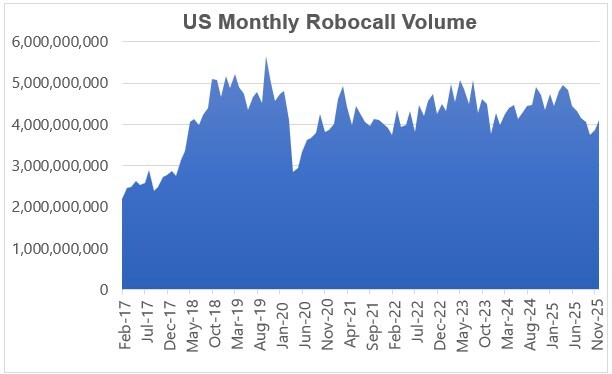
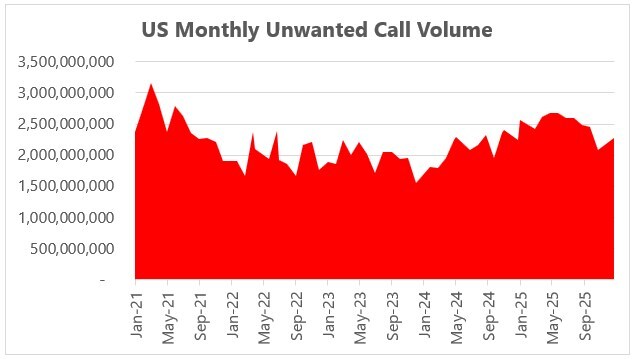
Fortunately, you have several tools at your disposal to combat robocalls:
Carrier Provided Call Screeners
- Verizon Call Filter is a service that helps block spam, fraud, and robocalls by identifying and screening unwanted numbers, with basic features free on standard plans and an upgraded "Call Filter Plus" for more features like Caller ID and personal lists.
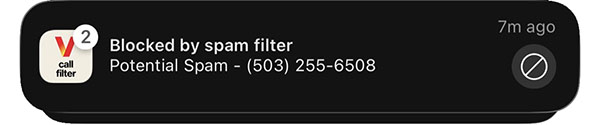
- AT&T offers several tools to block robocalls, primarily through the AT&T ActiveArmor app for mobile (with free and paid features like spam blocking/labeling) and Call Protect/Call Filtering.
- T-Mobile offers SpamShielp, free advanced anti-scam features like Scam Likely, Scam Block, and Caller ID. You can get it on your T-Life app.
Smartphone Native Call Screeners
- iPhone call filtering (iOS 17 and later) reduces spam by silencing unknown numbers, sending them to voicemail, or using Live Voicemail to ask for a reason for the call. Enable these features in Settings > Apps > Phone, where you can select "Silence Unknown Callers" or "Ask Reason for Calling" under Call Screening. [ Watch this video to activate. ]
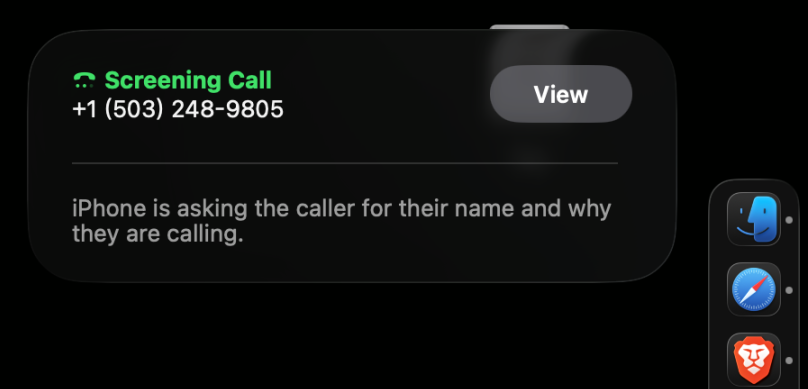
If you have a Mac, you can observe the call screening process live.
- Android call filtering uses built-in phone app settings or third-party apps to block unwanted calls by identifying spam/scams and managing unknown numbers, with options to filter calls to voicemail or block them entirely, often found under the Phone app's Settings > Caller ID & spam. You can enable Caller ID & Spam protection to see who's calling and automatically filter suspected spam or manually block numbers and manage settings for calls from numbers not in your contacts. [ Watch this video to activate. ]
Other Call Screeners Offering Additional Protection
- YouMail: A totally free app that protects consumers from unwanted or dangerous calls, texts, and voicemails. YouMail calculates national robocall trends by extrapolating from the robocall traffic attempting to get through to YouMail's millions of active users.
- Google Call Screen: Pre-installed on Pixel devices, this app (available on other Androids) uses Google Assistant to automatically screen unknown callers, filtering out robocalls before your phone rings.
- Truecaller: A top-rated app for identifying spam and fraudulent calls, featuring a "Truecaller Assistant" that uses AI to answer calls and interact with callers.
- Robokiller: Spam call blocker for iPhone and Android with a free trial. Also blocks texts. More than 1m users.

Part II - Preventing Your Business from Being Blocked
To help ensure that outgoing calls from your business don't suffer collateral damage from robocall filters, you can take steps to add legitimacy to your outgoing phone number(s).
- Free Call Registry: Register outbound business phone numbers for free. It only takes about a minute to register. However, you must renew every 180 days.
- Hiya: Register your business numbers so carriers know you're legitimate. Then see your spam status and get a report card — all free, all in one place.
We recommend that you take a few minutes to register with these two services. If your business has multiple phone numbers, then be sure to list each outgoing number.
[ Return to News & Commentary home. ]
[ Return to Nextworks IT home. ]


